QEMU vs KVM for agent sandboxes: the view from Opencomputer's QEMU-on-KVM fleet
By Utpal Nadiger, Opencomputer · July 20, 2026
If you searched "QEMU vs KVM" while picking an isolation stack for AI agents, the first thing to know is that they are not competing options. KVM is a module inside the Linux kernel, QEMU is a program in userspace, and production stacks run them together, so "which one" has no answer.
The confusion is old and well-earned. The most-viewed question on the subject asks which of the two manages RAM and which schedules I/O, and the boundary is non-obvious until someone draws it.
The definition block below settles that boundary. The more useful question comes after it: KVM stays constant in every stack that uses it, so the real decision is which userspace VMM sits on top, QEMU, Firecracker, or Cloud Hypervisor.
We run QEMU on KVM in production under the sandbox fleet at Opencomputer. The second half of this article evaluates all three VMMs against the four criteria that fleet taught us to care about: restore latency, density, session lifetime, and snapshot semantics.
What is the difference between QEMU and KVM?
KVM (Kernel-based Virtual Machine) is a module inside the Linux kernel. It exposes the CPU's hardware virtualization features to userspace and manages the sharing of RAM and CPU time among the virtual machines on a host. QEMU is an ordinary program running in userspace, like any other process on the machine. In virtualization vocabulary it is a virtual machine monitor, a VMM: the program that supplies everything a running machine needs beyond CPU and memory, meaning emulated devices such as disks and network cards, the I/O behind them, and the VM's lifecycle from create through snapshot to destroy. QEMU uses KVM; they are two parts of one stack. On a Linux machine whose CPU has virtualization extensions, QEMU hands the CPU and memory work to KVM and keeps the device and I/O work for itself. Neither runs a VM alone: KVM without a userspace program does nothing visible, and QEMU without KVM has to emulate the CPU itself in software, slowly.
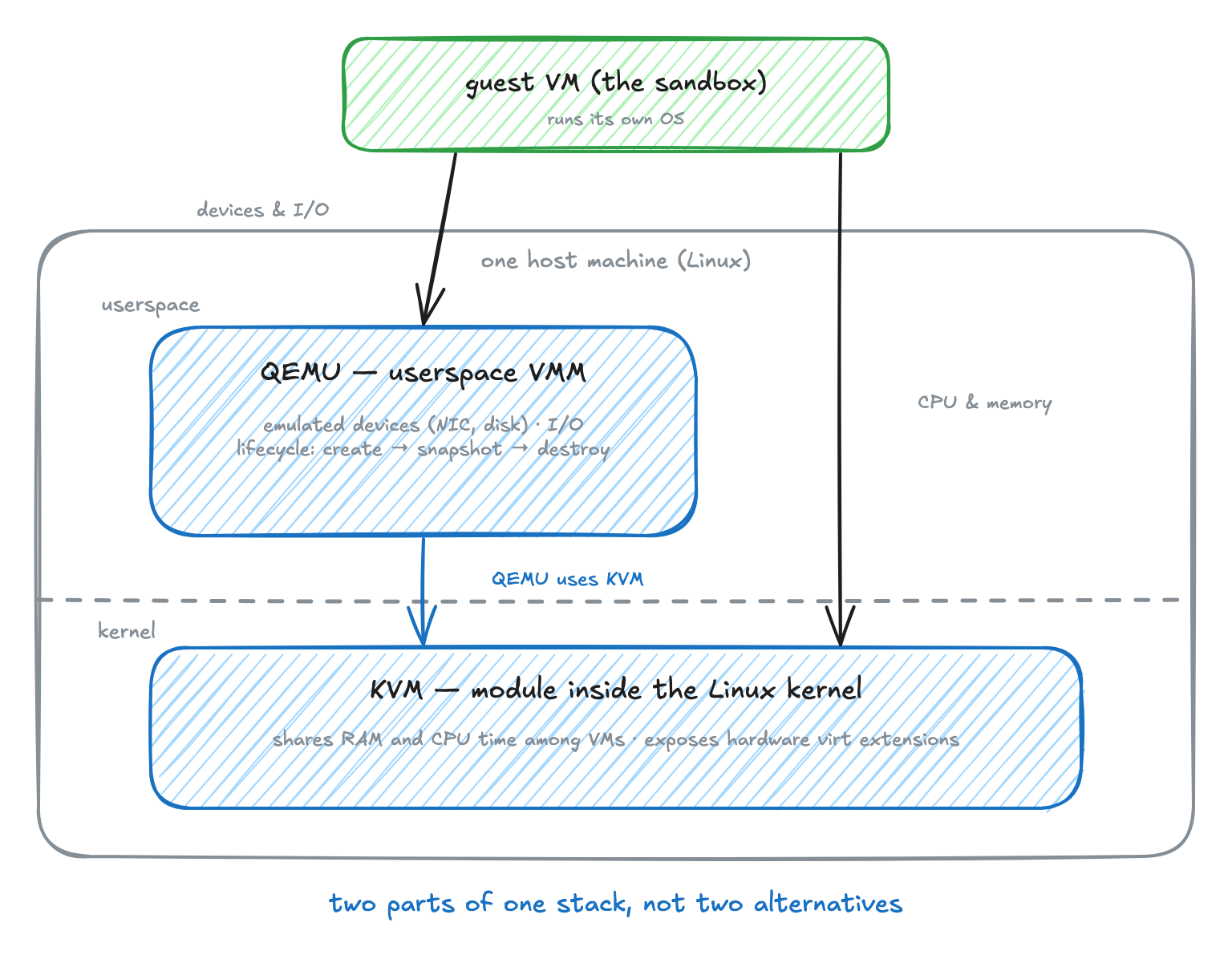
Networking is a concrete example of the device work QEMU keeps. Two terms first: the host is the physical machine, and the guest is the virtual machine running on it.
Every sandbox in our fleet needs internet access. Inside the guest, the operating system sees a normal network card. That card does not physically exist; QEMU emulates it. On the host, QEMU connects the emulated card to a TAP device (named after a network tap: a virtual network interface the Linux kernel provides so a userspace program can send and receive packets), and NAT (network address translation) carries the sandbox's traffic out to the internet.
KVM plays no part in any of this. It arbitrates CPU and memory the whole time, and it neither knows nor cares that the guest thinks it has a network card. The same division holds for every other device in the machine.
Is KVM a type 1 or type 2 hypervisor?
The remaining vocabulary problem is the word hypervisor itself. In plain terms, a hypervisor is the software layer that lets one physical machine run several virtual machines at once and keeps them out of each other's way. KVM gets called a hypervisor, QEMU gets called a hypervisor, and the two running together get called a hypervisor, so the word can point at either half of the stack or at the whole thing, depending on who is writing.
The traditional classification is supposed to sort this out. A type 1 hypervisor runs directly on the hardware, with no operating system underneath it. A type 2 hypervisor runs as an application on top of an operating system, the way any other program does.
Applied to KVM and QEMU, the labels contradict each other. One explainer assigns both types to the same stack: "KVM is a type 1 hypervisor, which essentially means it is able to run on bare metal. QEMU is a type 2 hypervisor, which means that it runs on top of the operating system". Other pages label the combined QEMU-on-KVM stack type 1, and others call the same combination type 2.
The same fight runs about Firecracker: "Listen people, Firecracker is NOT A HYPERVISOR. A hypervisor runs right on the hardware. KVM is a hypervisor. Firecracker is a process that controls KVM".
The labels contradict because they predate the split of labor KVM introduced. Type 1 and type 2 assume the hypervisor is one piece of software that either owns the hardware or sits on an operating system. KVM puts half the job in the kernel and half in an ordinary userspace program, so neither label fits.
What we can say consistently is what the definition block already says: KVM is the kernel hypervisor, and QEMU, Firecracker, and Cloud Hypervisor are userspace VMMs that drive it. Under those terms Firecracker sits in the same category as QEMU, a VMM, and the is-it-a-hypervisor argument goes away. The rest of the article uses these two terms.
Why do we still need QEMU if KVM is a hypervisor?
Because KVM cannot run a virtual machine by itself. It arbitrates CPU and memory from inside the kernel, and that is the whole job; without a userspace program on top, KVM does nothing visible. Every VM on a KVM host is run by some userspace VMM that supplies the devices, the I/O, and the lifecycle.
The question persists even among people who already know the definitions. One asker had the pieces, "I have known that KVM is a module of Linux Kernel, KVM converts Linux into a type-1 (bare-metal) hypervisor," and still wanted to know why QEMU has to be there.
The trouble is the hypervisor word again. Once KVM is "the hypervisor," QEMU sounds like an optional legacy layer that the kernel will eventually absorb. It will not, because the kernel module was never built to do the userspace half of the machine.
What can change is which program fills the seat. Firecracker and Cloud Hypervisor fill it too, and which of the three to run on top of KVM is the decision the rest of this article is about.
Which VMMs do the sandbox vendors actually run?
Most of the sandbox platforms you'd shortlist share their bottom half. Three terms before the map:
- A microVM is a virtual machine stripped down for exactly this work: a minimal device set, no legacy hardware emulation, built to boot fast and pack many to a host.
- Firecracker is the best-known microVM VMM, deliberately small at about 50,000 lines of Rust against QEMU's roughly two million lines of C.
- Cloud Hypervisor is a third VMM in the same seat, newer than QEMU and fuller-featured than Firecracker.
All three drive KVM.
Earlier this year we fingerprinted six agent-sandbox vendors from inside their own sandboxes. E2B and Sprites run Firecracker microVMs. Blaxel runs Firecracker with Unikraft, a unikernel, meaning the application is compiled together with a minimal kernel into a single bootable image. exe.dev runs Cloud Hypervisor.
The two exceptions: Modal runs gVisor, which is not a VMM but a sandbox that intercepts the guest's system calls in userspace (itself sitting on an Azure VM), and Daytona runs Docker with Sysbox containers. So four of the six are KVM shops that differ only in the userspace layer.
Northflank states outright that it runs Cloud Hypervisor through Kata Containers, a wrapper that runs each container inside its own VM. And we run QEMU on KVM in cells of 5 to 10 worker machines.
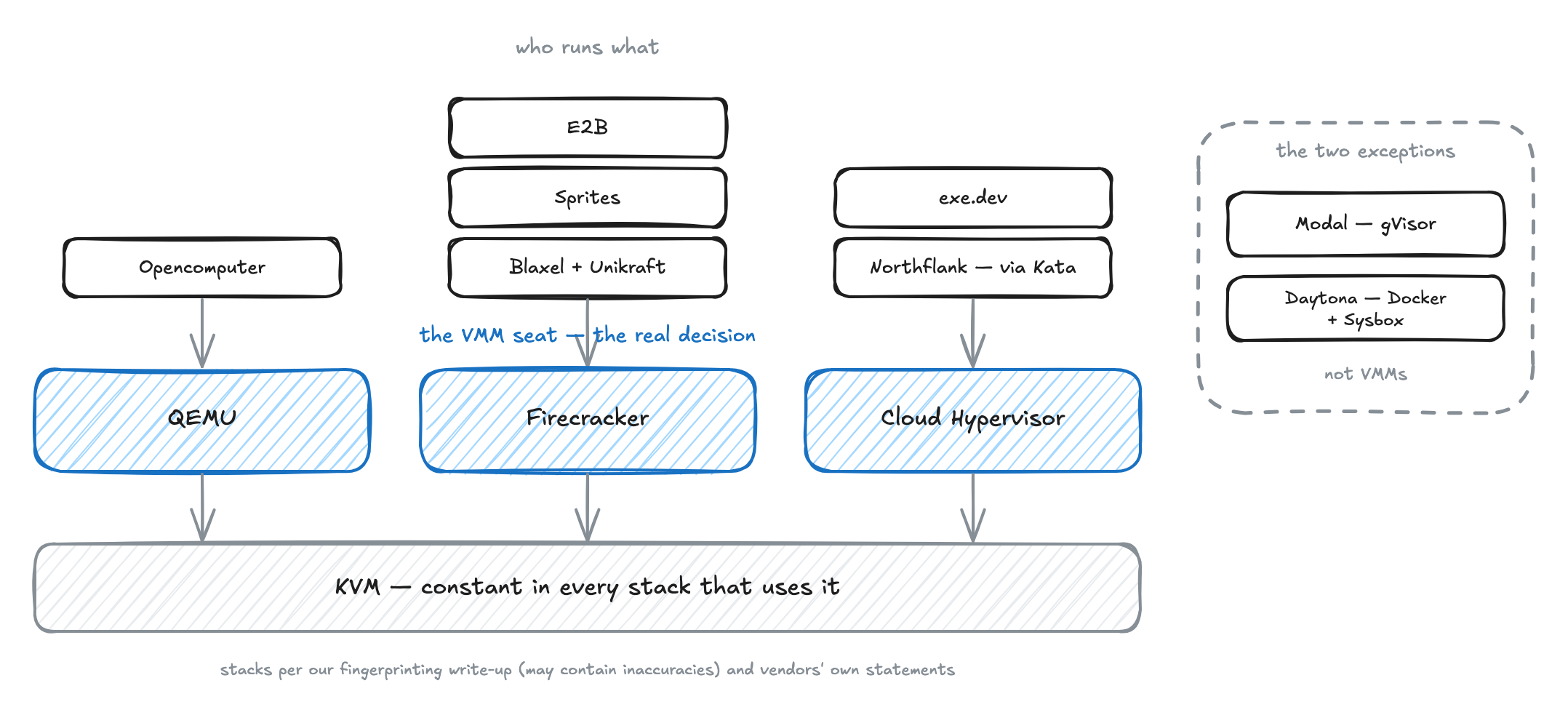
Nearly every vendor on that map chose a VM boundary, and for the same reason: microVMs are the default isolation for untrusted, per-session agent code, and plain Docker with default settings is not a sandbox. The demand keeps growing; Google reported 16x sandbox growth on GKE in under five months.
The rest of this article assumes hardware isolation and asks only how the three VMMs differ.
Does VM boot time matter for AI agents?
It matters in two situations:
- Interactive sessions, because a person watching a chat window notices one second of latency while an agent runs
print(1+1). - Subagent fan-out, where a single session can spawn twenty subagent VMs, a heavy user can rack up thousands of VM boots a week, and per-boot seconds compound into hours of waiting.
For batch agent work the skeptics are right: model inference time dominates and boot time washes out.
There is a catch in how these latencies get measured, though. A VM can start two ways. A cold boot starts it from nothing, through firmware, kernel, and init. A snapshot restore loads a saved copy of an already-booted VM's memory and device state, skipping the boot entirely. Vendors advertise cold boot numbers, but production fleets start almost every sandbox from a snapshot, so restore latency is the number that determines what users wait on.
The cold boot numbers in circulation are real. Firecracker's headline figures are about 125ms to boot, under 5 MiB of memory overhead per microVM, and up to 150 microVMs created per second on one host. QEMU's default configuration boots in several seconds with hundreds of MiB of overhead, a default nobody shipping sandboxes actually runs.
The restore numbers are in a different class. One practitioner who built agent sandboxes this way measured Firecracker's cold boot at about 1.1 seconds and snapshot restore at about 28 milliseconds. The restore is little more than starting the VMM process, memory-mapping the snapshot file, reloading CPU and device state, and reconnecting the control channel.
Firecracker's documentation explains why restore is that fast: no kernel boots and no init runs; the file is mapped and execution resumes exactly where it stopped. The mapping is copy-on-write, meaning pages load on demand and stay shared read-only between VMs restored from the same file until one of them writes.
Fleets build on this with a golden snapshot, a single pre-booted, pre-configured image that every new sandbox is cloned from, kept on a warm pool of workers that already hold it locally.
Our own numbers say the same thing about QEMU. Stock QEMU cold-boots in about 30 seconds; we brought sandbox boot under 1 second at p95. A boot from a golden snapshot lands around 300ms, and around 200ms when the snapshot is already warm on the worker. Snapshot warmth, not hypervisor brand, is the latency lever.
How many sandboxes fit on one host?
The spec-sheet answer is per-VM overhead, and Firecracker owns that number at under 5 MiB per microVM. But per-VM overhead describes one VM, and density is a property of the fleet.
Hosts earn their density from two things: overcommit, promising the guests more total memory and CPU than the host physically has, on the bet that they will not all peak at once, and the copy-on-write page sharing described in the last section, where clones of one snapshot keep their unwritten pages in common.
At fleet scale the single-VM picture can invert. One practitioner who operates both VMMs reports that QEMU microvms (microvm is QEMU's stripped-down machine type, modeled on Firecracker) use a bit more memory individually but less real system memory as the number of VMs grows, allowing denser placement than Firecracker.
What if a session lives 30 minutes, or a month?
The standard decision rule, Firecracker for AI sandboxes, assumes sessions are short and uniform. Plenty are not. As one practitioner building agent infrastructure put it, "Sometimes a VM can live for 30 minutes, but it also might need to live for a month, and I don't know beforehand". A session like that needs to give memory back when idle and cost nothing while parked, and those two abilities matter more than how fast it boots.
This is a hard engineering problem, and it is the one our fleet at Opencomputer is built around. An idle sandbox hibernates: the platform snapshots the VM's memory and disk state, then stops it, so a parked session costs no compute. Hibernating completes in about 6 seconds in the typical case, and waking averages 1 to 2 seconds, depending on whether the saved state is still warm on the worker or has to come back from S3-backed storage.
A rolling 300-second idle timeout hibernates sandboxes automatically, and memory and CPU resize at runtime from 1 to 16 GB. This machinery serves a durable agent sessions API where idle sessions hibernate and wake on the next message. A session can live 30 minutes or a month, and nobody has to know beforehand.
Getting there on Firecracker is harder. Once a workload inside allocates RAM, Firecracker never returns it to the host; a team that ran developer environments on it reported idle VMs holding 32 GB on the host that the guest no longer needed. For VMs that live seconds or minutes that doesn't matter; for VMs that run hours, days, or months, it is fatal.
CodeSandbox made long-lived environments work on Firecracker anyway, reclaiming memory with a balloon device, a driver inside the guest that inflates to hand memory back to the host, plus disk discard and io_uring, conceding that it is more work and requires custom implementations.
The QEMU direction costs engineering too; Hocus spent two months reaching a reliable proof of concept. Whichever VMM you start from, unknown-lifetime sessions are an engineering program, not a configuration flag.
AWS caps its serverless microVM sessions at 8 hours; a common community explanation is Firecracker's RAM reclamation, though that is community interpretation, not AWS's statement. In the same thread, an AWS engineer argues that a VM per agent session is the emerging pattern for multi-tenant agent systems.
Whichever VMM sits underneath, hibernate and wake latencies belong in the evaluation next to boot latencies, because they are what the month-long session exercises.
Can a fleet be cloned from one golden snapshot safely?
Not without care. Every VM in the fleet is a copy of the same saved state, and some of what got saved was never meant to exist twice.
The problem, in Firecracker's own snapshot documentation: without a strong mechanism guaranteeing that unique things stay unique, "we consider resuming execution from the same state more than once insecure." Unique identifiers, cached random numbers, and cryptographic tokens replicate across every microVM resumed from the same snapshot.
Golden-snapshot cloning is exactly that, one state resumed many times, and it is the standard fleet pattern, ours included. We are flagging the problem here, not solving it; we have not published our mitigation approach. If your architecture clones from golden snapshots, clone uniqueness belongs on the design review agenda before the first token leaks across sandboxes.
Snapshots carry smaller caveats too, different per VMM. On QEMU, the savevm/loadvm snapshot path writes the entire VM state into a qcow2 disk image, so at least one writable qcow2 disk is required, and snapshots are not guaranteed to work across QEMU versions.
On Firecracker, a restored VM resumes with the guest wall clock still set to the moment of snapshot creation, network connectivity is not guaranteed after resume, and snapshots must be resumed on software and hardware nearly identical to where they were taken.
None of this makes snapshots optional. Restoring in milliseconds, forking a running session, and checkpointing an agent's work all depend on them. Our own checkpoints come in two kinds: full checkpoints capture disk, memory, and CPU state for the fastest restore, and disk-only checkpoints are lighter, with forks booting from the saved disks.
Which VMM should I use for an AI agent sandbox?
Use QEMU, unless your sessions are short-lived and uniform. That is the answer our fleet runs on, and the reasons come from the four criteria above.
Session lifetime decides it. Agent sessions have unknowable lifetimes, and QEMU is the only one of the three with the full toolkit for that: virtio-mem, a device that adds and removes guest memory while the VM runs, live migration to consolidate idle VMs onto fewer hosts, and the hibernate-and-wake machinery our fleet runs on.
Firecracker never returns allocated RAM to the host. Cloud Hypervisor documents hotplug and migration, but has published no numbers for restore latency or density.
The costs people expect from QEMU stop applying once you tune it. The 30-second cold boot becomes 300ms from a golden snapshot, which sits in the same effectively-instant band as Firecracker's 28ms restore, below what a person notices. Density can come out ahead of Firecracker at fleet scale, per the one operator who has published on running both.
The honest costs that remain: tuning QEMU to that point is real engineering work (Hocus reported two months), the ~2M-line codebase is more surface to trust than Firecracker's 50,000 lines, and savevm snapshots are not guaranteed across QEMU versions, so version upgrades need a migration plan.
You also don't have to do that tuning yourself. It is what Opencomputer sells: the tuned QEMU fleet with the 300ms boots, hibernation, live migration, and resizable memory already running, with sandboxes and agent sessions as the API on top.
The exception is real. If your sessions are disposable, seconds-to-minutes, at high volume, Firecracker is the better tool: smallest overhead, fastest measured restore, and none of its exclusions cost you anything. It was built for exactly that shape and wins there.
Cloud Hypervisor is the one we would not start with today. Its feature list overlaps QEMU's where it matters for agents, but the published record is thin, so you would be producing your own numbers for every criterion that decides the choice.
FAQ
What is the difference between QEMU and KVM?
KVM is a module inside the Linux kernel that arbitrates CPU and memory for virtual machines; QEMU is a userspace program that supplies everything else, the emulated devices, the I/O, and the VM lifecycle. Neither runs a VM alone: KVM does nothing visible without a userspace program, and QEMU without KVM must emulate the CPU in software, slowly.
Why do we still need QEMU if KVM is a hypervisor?
Because KVM only does the kernel half of the job. Every KVM stack needs a userspace VMM for devices, I/O, and lifecycle. QEMU is the most complete program in that seat; Firecracker and Cloud Hypervisor are the minimal alternatives, and choosing among the three is the real decision.
Does QEMU use KVM or are they separate things?
Both. They are separate projects, but on a Linux host with virtualization extensions QEMU hands CPU and memory work to KVM and keeps the device and I/O work for itself, so in practice they run as one stack. QEMU can also run without KVM by emulating the CPU in software, at a large speed cost.
Which VMM should I use for an AI agent sandbox: QEMU, Firecracker, or Cloud Hypervisor?
QEMU, unless your sessions are short-lived and uniform. Agent sessions have unknowable lifetimes, and tuned QEMU has the full toolkit for that: memory that returns to the host while the VM runs, live migration, and golden-snapshot boots around 300ms. Firecracker is the better tool for disposable, seconds-to-minutes, high-volume sessions. Cloud Hypervisor has the right feature list on paper but almost no published numbers, so evaluating it means producing your own.
Does VM boot time matter for AI agents?
It matters for interactive sessions, where users notice one second of latency, and for subagent fan-out, where boots multiply into thousands per user per week; for batch work, inference time dominates. The operative production number is snapshot restore, not cold boot: about 28 milliseconds measured on Firecracker, and on our QEMU fleet about 300 milliseconds from a golden snapshot, about 200 when the snapshot is already warm on the worker.