
What it takes to DIY your own Grokbot
By Mohamed Habib · November 5, 2026
Say you’re building your own version of Grokbot. What would it take? Let’s find out.
PS: Many of these concepts and diagrams are inspired by Lee Rob’s talk at Stanford.
1. The harness
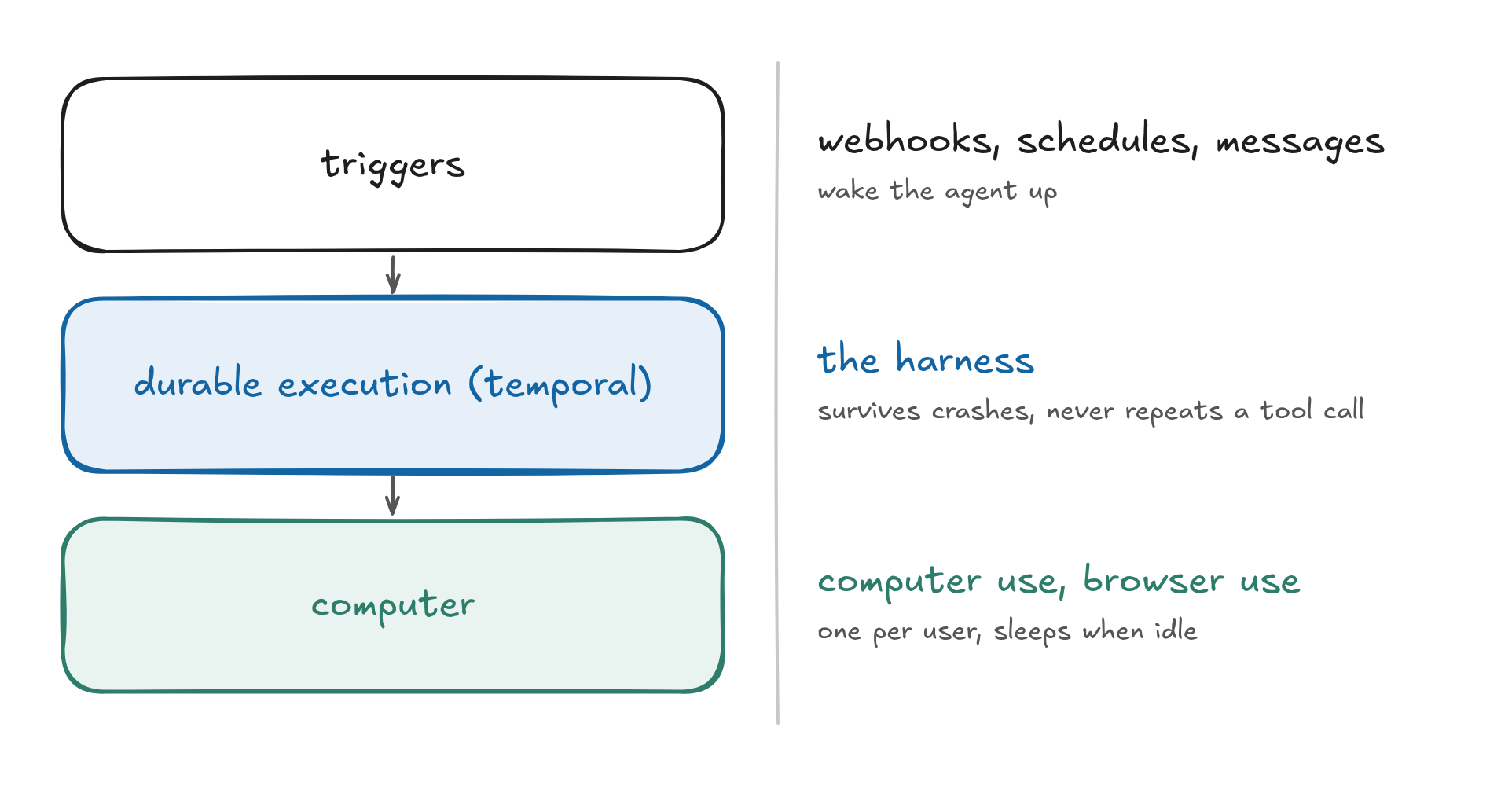
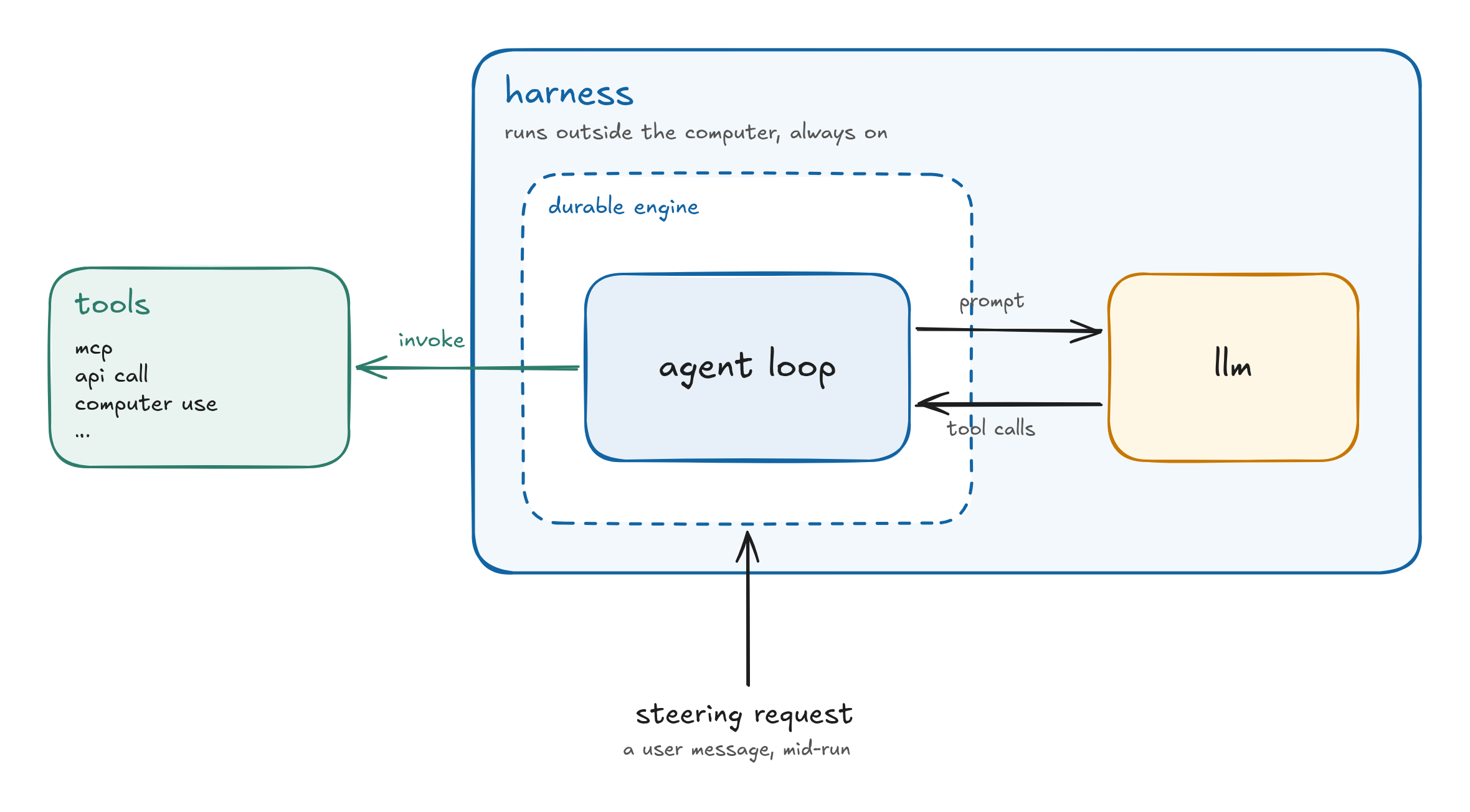
At the core of Grokbot’s design is the harness: the agent loop that calls the LLM at regular ticks and performs actions called “tools”. A harness is usually hyper-optimised, and Grokbot’s harness is proprietary, so we can’t use it in our personal Grokbot. We are left with building our own from scratch or using an off-the-shelf one.
Among the off-the-shelf ones we could pick open source harnesses such as pi or opencode, or we could pick Claude Code or Codex as proprietary harnesses to use with the big labs. Whichever we choose probably supports these concepts, which are referenced in Grokbot’s architecture:
1.1 Context management
Every harness has a limited context window depending on the model being called. Traditionally context compaction has been a huge problem, but modern harnesses got very good at using multiple techniques to keep the context efficient. In addition to that, they also have very good compaction, which makes context handling not a huge issue. Some of the techniques used by harnesses include:
1.2 Use of subagents
In Grokbot and others, when an agent performs a task such as analyzing a screenshot it was sent or performing some computer use task, it delegates that task’s context to a subagent if it can. This makes context handling so much more efficient than if all the work was handled by the main agent.
1.3 Lazy loading of tools
The harness does not load all tools and all calls eagerly. For example, in the case of memory only the core profile memory is loaded, whereas the ongoing memory scratchpad is written to files which can be read when needed. Same goes for tool calls: the harness only loads the tool descriptions, and loads a complete tool definition only when it needs to.
1.4 Compaction
Context is a finite resource at the end of the day. Many harnesses perform compaction when the context fills. For always-on agents such as Grokbot, compaction is performed during a period of inactivity by the user. This gives the illusion of an infinite context window.
2. Durability
The harness needs a place to run “durably”. By durably we mean that it survives crashes and restarts, so it is able to recover from different situations without redoing the work all over again. This is important because if the harness is performing a tool call and something crashes, it must not repeat the same task twice. Imagine the harness sending an email on your behalf and, due to a crash, sending it twice. Or something worse, like making a purchase.
In the case of Grokbot they use Temporal for durability, and the harness agent loop itself runs outside of the user’s computer and communicates with it externally. The reason for this claim is that the computer available to every user goes to sleep when idle. Therefore there needs to be an external “server” that wakes up the computer according to various triggers. A trigger can be anything from a user message to a scheduled task that the agent needs to perform. So an always-on server component needs to be present to wake up the machine.
Durable Objects by Cloudflare are a very solid option here. For example, opencode v2 can run inside a Durable Object (beta). Grokbot seems to be using Temporal for the durability layer. Either way, the harness and the management of messages live outside of the computer, and you need a durability layer that can handle external requests and wake up the computer when needed. Having the harness in that layer is also not a bad idea.
3. The computer
Now we come to the meat of Grokbot’s speciality, which is the computer. One of the unique parts of this architecture is that it is a persistent computer for every user. In many previous iterations of similar products one would spin up a computer (sandbox) for each session. This is problematic in many ways because you need to figure out how to transfer state from one session to the next. When it is just a single computer everything becomes much easier, and suddenly the model of many agents controlling this shared computer makes more sense. Each Grok “bot” gets its own virtual desktop, but they still share the file system. This means the user’s memory and files can be shared by all the agents, which is very convenient.
Whilst Grokbot calls it “always on”, in reality they have chosen to make the computer go to sleep when not in use. In my opinion this doesn’t need to be done, since an idle computer doesn’t consume much memory, and one can always pack them aggressively as virtual machines on a server. But to save on RAM they have chosen to snapshot it to disk, which is also viable. The trade-off is saving precious RAM vs keeping the machine and its processes at very low latency.
Computer and browser use
An agent has access to the computer, so to build another Grokbot we need to teach it how to use the machine and click around. We also need to teach it how to browse the web and read webpages. There are three main interactions visible in Grokbot:
- Read the computer screen: a vision model makes sense of the screen and clicks.
- Read the browser page structure: use the DOM and browser-based models to navigate webpages and perform actions.
- Ask a human: when it’s stuck on a task, a human can take over the agent’s view of the desktop and get the task done, which helps it learn.
In our case any computer will do. We can get a VM from AWS or another hyperscaler and configure an OS with multiple workspaces and streaming on it, which would let us deliver the same experience.
4. Triggers
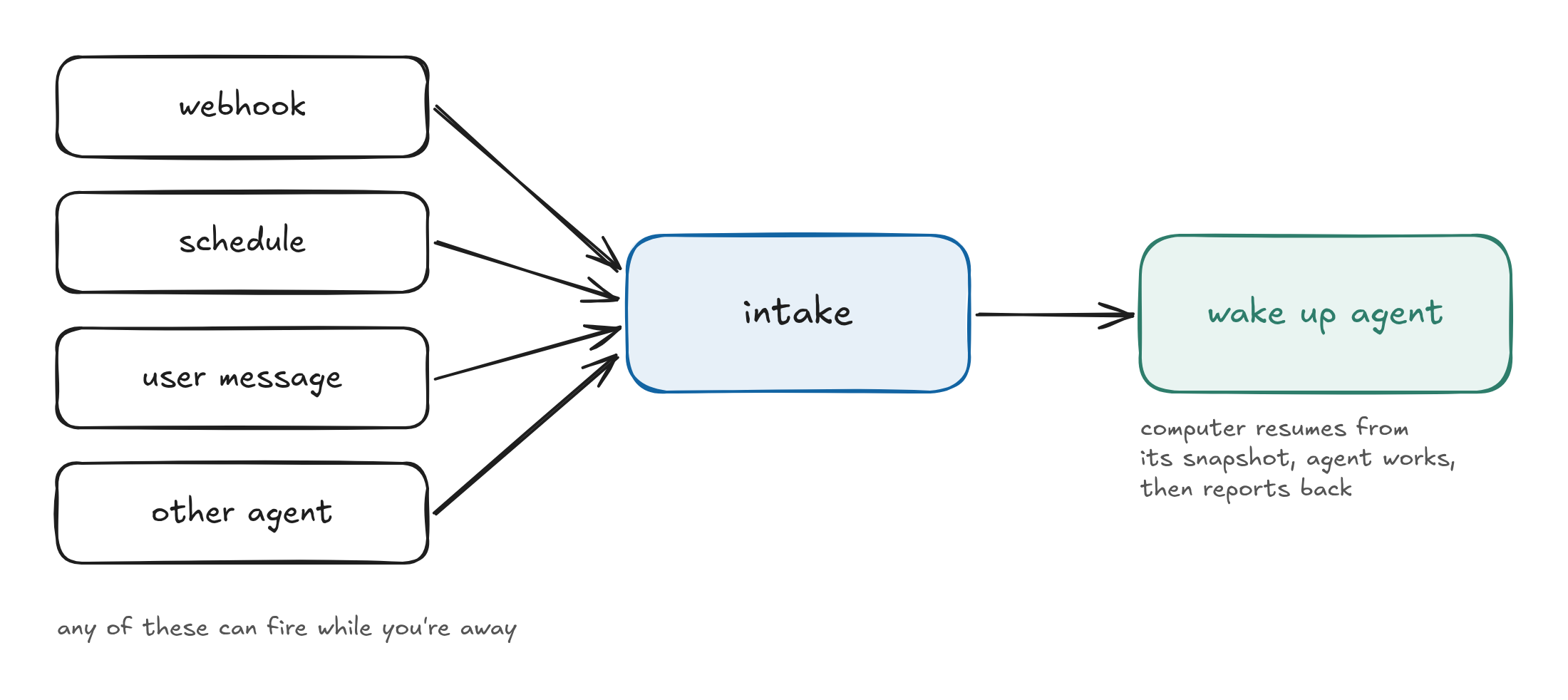
One of the great parts about Grokbot agents is that they can be woken up without the user being around. For example, you can ask your Grokbot to continuously scan Zillow for houses and send you matches, or to keep working through a todo list from your emails. A lot of these are webhook or schedule based triggers which wake up the agent, make it do work, and then get back to you. To make triggers possible, the durable harness needs to live outside of the computer (since the computer needs to go to sleep).
5. Memory
When it comes to memory, the current state of the art seems to be markdown files in a hierarchy. The most important memory can be appended to the system prompt for each user. Other levels of memory can live in folders and files so that the harness can search them when needed. In Grokbot there are these variations of memory:
- profile: the core facts the harness knows about the user, similar to
IDENTITY.mdin openclaw. This is always in the prompt (but short). - log: dated events that the agent can choose to write for the future.
- notes: ephemeral 30-minute notes, basically a scratchpad for the harness.
- search tool: used to search other sessions, basically the catch-all for everything.
We see a similar system used by agents such as Devin. Memory for a user can live in a separate git repo, pushed periodically to keep it independent of the underlying machine.
6. Evals and self-improvement
As a product like Grokbot gets mass adoption, it is very important to learn from its mistakes. Every mistake or misstep the agent takes is an opportunity to improve the product. There are multiple ways to improve depending on the error observed:
- Improve the harness loop
- Improve the system prompt
- Improve the model (labs)
Since Grok also owns the models, they can do all three. For consumers of other models, the opportunity to improve lies in the first two. However, improvement can only happen with a continuous set of evals built from cases where the agent took wrong actions. So it is important to have a loop: take a mistake from the agent, compile it into an evaluation suite, and then do the product work to make sure the agent passes that eval in the next iteration of the product.
Grokbot vs others
| Product | Built for | Shared agent in Slack | Writes code, opens PRs | Pricing model | 10 devs / month | Availability |
|---|---|---|---|---|---|---|
| Grok Bot | One person (Team Bots on team plans) | Yes, they have “Team Bots” | Yes, via Cursor Cloud Agents | Per seat ($30 / $100 / $200) | ~$300–$2,000 | Generally available |
| Dots | One person | Partly: a Dot joins a channel as its owner | Draft PRs via GitHub | Per seat ($100–$125 Business Premium; Pro $100–$500) | ~$1,000–$1,250 | Pro and Business Premium |
| Muse | One person | No | No (Muse Code is a separate terminal agent) | Per person ($0 / $20 / $100) + Muse Code tokens | No team plan | US and Canada |
| Claude Duet | One person | No | No (Claude Code is separate) | Included in Pro / Max during preview | Not offered for teams | Research preview, US waitlist |
| OpenComputer (@Computer) | Your entire Slack workspace | Yes, @Computer in any thread | Yes, Claude Code or Codex | Per workspace ($20 Pro / $200 Max plan), work minutes | $200 + model costs (pass-through at API price, or devs bring their own subs) | Generally available, 3-day trial |